
The Product Owner role in Scrum
By Scrumagic Team Last reviewed 6 min read
In short
The Product Owner is one person accountable for the value of the product. They set and communicate the Product Goal, keep the Product Backlog ordered and understood, and make the calls about what comes first. They can take advice from anyone, but the decision is theirs, and the organisation has to respect it.
Ask five teams what their Product Owner does and you'll get five answers, most of them about meetings or paperwork. The Scrum Guide's answer is shorter and harder: the Product Owner is accountable for maximising the value of the product that results from the team's work.
One person, not a committee
The first thing the Guide settles is that the Product Owner is one person. They may take advice from many people, and they may delegate the work, but they stay accountable. The Guide adds the condition that makes this possible: for a Product Owner to succeed, the whole organisation has to respect their decisions.
That second sentence is the one that gets ignored. A Product Owner who has the title but whose priorities are overruled by a steering group has the accountability without the authority, and the team ends up taking instructions from whoever shouts loudest. If you are about to introduce Scrum, check this first.
What they are accountable for
The Guide lists four things:
- Developing and communicating the Product Goal, which describes a future state of the product that the team can plan against.
- Creating and clearly communicating Product Backlog items.
- Ordering those items.
- Making sure the Product Backlog is transparent, visible and understood.
Notice what isn't on the list: writing every story, attending every meeting, signing off the work, managing the people, or deciding how it gets built. The first of those is delegable and the rest belong to others. Developers decide how to build things. The Product Owner decides what is worth building and in what order.
Ordering is the job
If you remember one word from the role, make it ordering. A backlog is not a wish list. It's an ordered argument about what will create the most value next, given what is known.
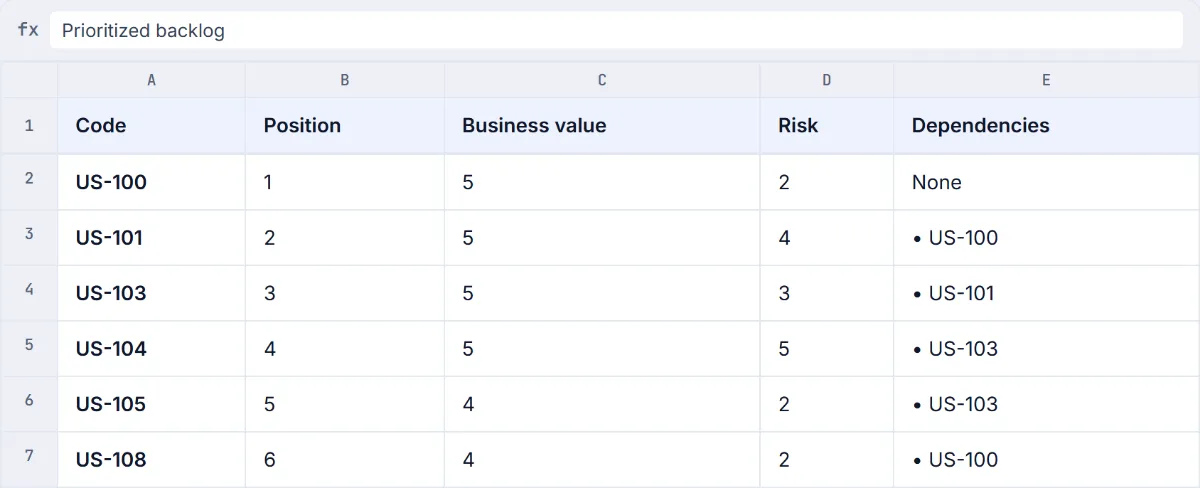
Here is the top of a prioritised backlog from the Donation Portal scenario in the Scrumagic simulator. It's a fictional project, and this is an excerpt.
The text of this excerpt
Code, Position, Business value, Risk, Dependencies US-100, 1, 5, 2, None US-101, 2, 5, 4, US-100 US-103, 3, 5, 3, US-101 US-104, 4, 5, 5, US-103 US-105, 5, 4, 2, US-103 US-108, 6, 4, 2, US-100
Two things are worth noticing. The items with the highest business value come first, and each item sits below the one it depends on, so nothing is planned before the work it needs. That is a real constraint, because a backlog that ignores dependencies produces Sprints that stall on the third day.
What the excerpt can't tell you is what US-104 actually is. The codes stand in for stories, so a stakeholder reading this learns nothing about what they're getting. In practice, a backlog that only the Product Owner can read fails the "transparent, visible and understood" test. The other missing piece is the reasoning: it isn't recorded why an item of top business value and the highest risk on the page (position four) goes before a safer item of slightly lower value. That choice is the Product Owner's, and a few words explaining it would save an argument later.
Saying no
The hardest part of the job is the word nobody wants to hear. A sponsor asks for one more feature. A stakeholder wants their request moved up. A developer's favourite improvement is nowhere near the top.
Saying no well is mostly a matter of what you point at:
- The goal. "Does this help us reach the Product Goal, or the Sprint Goal?" is a question, not a refusal, and it moves the argument from the person to the purpose.
- The order. "It's on the backlog, here is where, and here is what has to come before it." A request that is acknowledged and placed isn't refused. It's ordered.
- The cost. Everything added pushes something else down. If the stakeholder can name what should drop, they're doing the Product Owner's job with them.
What a Product Owner shouldn't do is say yes to everything and let the Developers sort it out. That makes the backlog a list of promises, and each one eventually gets broken.
The people around them
A Product Owner works across three groups, and most of the trouble comes from mixing them up.
Stakeholders have interests and opinions. The Product Owner listens to all of them and acts for none of them in particular. The Developers need a backlog they can plan from, and a Product Owner who is available to answer questions during the Sprint. The Scrum Master helps the Product Owner find ways to define the Product Goal and manage the backlog well, and helps the team understand why clear backlog items matter. That's coaching, not supervision, and it's why the Scrum Master is not a project manager.
The Agile Manifesto's principles say that business people and developers must work together daily throughout the project. In Scrum the Product Owner is how that happens: one person the Developers can ask, so they don't have to guess.
What the role looks like during a Sprint
It's tempting to think the Product Owner's work happens before the Sprint, in ordering the backlog, and after it, in the review. In practice a lot of it happens in between. Developers need questions answered while they work, and a story that seemed clear at planning often turns out to have a gap. A Product Owner who is unavailable for the length of a Sprint leaves the team guessing, and guesses tend to be expensive.
The other recurring task is refinement, the continuing work of breaking items down and making them clearer. The Guide describes it as the act of breaking down and further defining Product Backlog items into smaller, more precise ones, and it leaves open how and when it happens. The Developers who will do the work are responsible for sizing, and the Product Owner makes sure that the next items are understood well enough to be sized.
Common misreadings
- "The Product Owner writes all the stories." The accountability is that items are created and clearly communicated. Developers and others can help write them, and the Product Owner may delegate.
- "The Product Owner is the project manager." The role has no accountability for staffing, schedule or how the work is done. It's about the value of the product.
- "The Product Owner is a proxy." A proxy is someone who relays what the real decision-maker wants and can't decide anything alone. If every call has to go up a chain, the team is waiting on a committee wearing one person's name.
- "The Product Owner approves every piece of work." In Scrum the Increment is judged against the Definition of Done, which the team creates. Whether and when to release it is a separate question.
Two perspectives
The Scrum Guide and SBOK agree here.
Scrum Guide
The Scrum Guide makes the Product Owner one person accountable for maximising the value of the product, for the Product Goal, and for creating, ordering and communicating Product Backlog items.
SBOK®
The SBOK® Guide describes the Product Owner as the voice of the customer, responsible for achieving the maximum business value for the project, and as the person who creates and maintains the prioritised Product Backlog.
Same thing, different words
- Product Backlog (Scrum Guide) = Prioritized Product Backlog (SBOK)
The two sources describe the same accountability with different emphasis. The SBOK frames it as customer value for a project, the Scrum Guide as the value of a product.
How to practise it
You can learn what the role covers in an afternoon. What takes longer is the judgement: ordering a real list when two items are both urgent, and saying no to someone senior without making an enemy.
Sources
- The 2020 Scrum Guide, Scrum Guides. Read on 8 October 2026.
- Principles behind the Agile Manifesto, Agile Manifesto. Read on 8 October 2026.
SBOK® is a registered trademark of its owner. Scrumagic is independent and is not affiliated with the owners of SBOK®.
Nothing opened? This computer may have no email program set up. Write it in Gmail or use the copy button and paste the link into your email.