
Sprint Planning: purpose and structure
By Scrumagic Team Last reviewed 7 min read
In short
Sprint Planning is the event that starts a Sprint. The whole Scrum Team agrees why the Sprint is valuable, what can be finished in it, and how the chosen work will get done. It ends with a Sprint Backlog: a goal, the items chosen to serve it, and a plan the Developers can follow.
A Sprint that starts without a plan the whole team believes in tends to spend its first week finding out that people understood it differently. Sprint Planning exists to close that gap before the work begins.
What the event is for
The Scrum Guide says Sprint Planning "initiates the Sprint by laying out the work to be performed", and that the resulting plan is created by the collaborative work of the entire Scrum Team. Two words in that sentence do the work: whole team and plan. It isn't a meeting where a Product Owner hands out tasks, and it isn't a ceremony to produce a document. It is where a team of people with different skills decides together what it is going to try to do, and how.
The Guide caps the event at eight hours for a one-month Sprint, and says it is usually shorter for shorter Sprints. Treat that as a ceiling. If your planning regularly fills the box, the usual cause is a backlog that wasn't understood well enough beforehand, not a team that needs more time.
Three questions, asked in order
Since the 2020 edition, the Guide frames planning as three topics. The revisions page notes that the "why" was added alongside the "what" and "how" that people already knew.
Why is this Sprint valuable? The Product Owner proposes how the product could increase its value in this Sprint, and the whole team agrees a Sprint Goal. That goal is the single objective for the Sprint. It's the sentence you'd use to explain to a stakeholder, in a corridor, what this Sprint is for.
What can be done this Sprint? Working with the Product Owner, the Developers select items from the Product Backlog to include. They may talk to the Product Owner as they go, because choosing is a negotiation: the Product Owner knows what matters most, and the Developers know what can be finished. Only the Developers can say what they believe they can complete.
How will the chosen work get done? For each selected item, the Developers plan the work needed to turn it into a usable result that meets the Definition of Done. How much they plan up front is theirs to decide. The Guide describes the Sprint Backlog as a highly visible, real-time picture of that work, which the Developers inspect and change at the Daily Scrum.
What comes out is the Sprint Backlog: the Sprint Goal, the selected items, and that plan.
Who does what
- The Product Owner comes with the Product Backlog in an order that reflects what matters, and can explain why. See the Product Owner role for what that accountability covers.
- The Developers decide how much they can take on and how they will do it.
- The Scrum Master makes sure the event happens, that it stays inside its timebox, and that everyone understands why it matters. They don't run it for the team.
Example: A tutoring app, Sprint 1
Say a team is building a booking app for independent tutors, and the Product Owner proposes a Sprint Goal: "A parent can find a tutor's open slot and request a booking." The Developers look at the top of the backlog. Creating accounts, setting weekly availability and viewing open slots all serve that goal. Payment doesn't, so even though it's next on the list, they leave it for later. Then they break each story into tasks, notice that availability has to exist before anyone can view it, and plan the order accordingly. The example is invented.
What a real Sprint Planning leaves behind
Here is the output of that kind of event in the Scrumagic simulator, from practice runs of two of its fictional scenarios. Each is an excerpt, not the whole artifact.
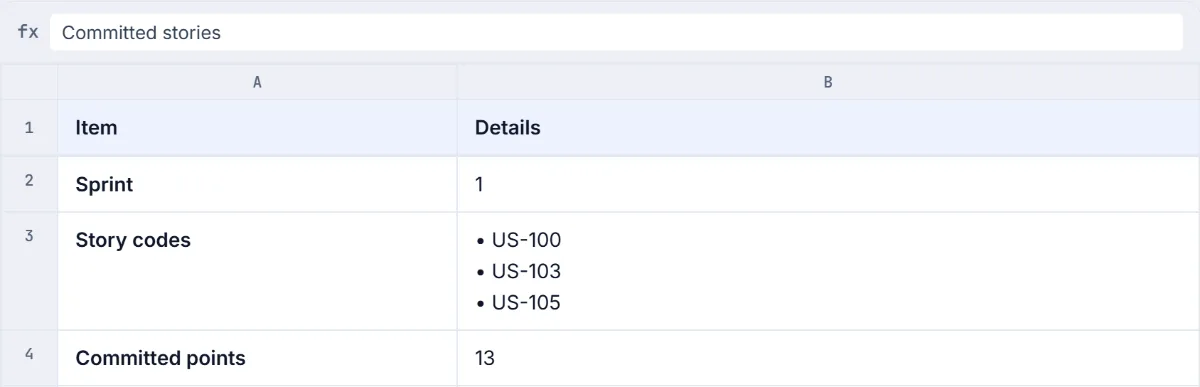
The text of this excerpt
Sprint: 1 Story codes: US-100, US-103, US-105 Committed points: 13
This is a decent record and an incomplete plan. It names the stories the team has agreed to try and the points they add up to. In this run the team's capacity for the Sprint was 20 points, so a commitment of 13 leaves room for the unplanned work that arrives in every Sprint, which is a sound instinct. What the record doesn't show is the reason these three were chosen, or what the team will do if one of them proves bigger than expected, and a Sprint Backlog needs both. The codes also stand in for stories, so a stakeholder reading this can't tell what is being built.
The goal that goes with a plan like this is a good example of what to avoid. This one is from the Tutor Booking scenario:
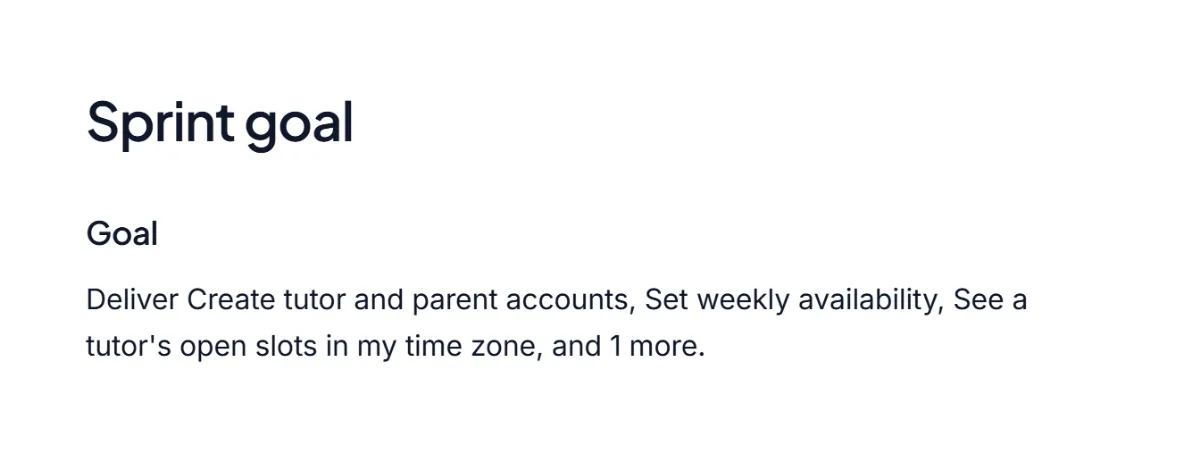
The text of this excerpt
Goal: Deliver Create tutor and parent accounts, Set weekly availability, See a tutor's open slots in my time zone, and 1 more.
That sentence is a list of story titles with a number on the end. It tells you what will be built and nothing about why. A goal like "a parent can request a booking with a tutor" gives the team something to protect when a request arrives mid-Sprint, because they can ask whether the request serves it. A list can't be protected, since every item on it is equally negotiable. The cause is easy to see: the goal was assembled after the stories, instead of before them.
Two perspectives
The Scrum Guide and SBOK differ here.
Scrum Guide
The Scrum Guide has one event, Sprint Planning, which starts the Sprint and answers three questions: why the Sprint is valuable, what can be done, and how the chosen work gets done. It produces the Sprint Backlog.
SBOK®
The SBOK® Guide spreads the same activity across several processes in its Plan and Estimate phase, including estimating and committing user stories, identifying and estimating tasks, and updating the Sprint Backlog, with a sprint planning meeting as a working session.
Same thing, different words
- Product Backlog items selected for the Sprint (Scrum Guide) = committed user stories (SBOK)
The SBOK breaks planning into separate steps with their own outputs, while the Scrum Guide treats it as one event with three conversations. Teams that follow either one plan the same things.
Quick answers
Which output of Sprint Planning gives the Developers a target? The Sprint Goal. The whole output is the Sprint Backlog: the Sprint Goal (why), the Product Backlog items chosen for the Sprint (what) and an actionable plan for delivering them (how). The goal is the part that tells the Developers what the Sprint is for.
How long is Sprint Planning? At most eight hours for a one-month Sprint, and usually shorter for shorter Sprints.
Who takes part? The whole Scrum Team: the Product Owner, the Scrum Master and the Developers.
The mistakes that come up most
- Planning to capacity, not to confidence. Taking on everything the numbers say you could do leaves no slack. A team that finishes less than it planned, every time, learns to distrust its own planning.
- A goal that is a list. If you can't state the Sprint Goal in one sentence without using "and", it is probably several goals, or none.
- The Product Owner decides alone. The Guide is clear that the Developers choose what they believe they can finish. A Product Owner who overrules that is planning for the team, and the team stops owning the plan.
- Treating the plan as a promise. The Sprint Backlog is expected to change as the team learns. What shouldn't change is the Sprint Goal.
- Skipping the "how". Teams that stop after choosing items discover on day three that two of them depend on each other.
Practising it
You can read the Guide's section on Sprint Planning in a few minutes. The harder skill is the live conversation: arguing for a goal, leaving a tempting story out, saying "we can't finish that" to a person who needs it.
Sources
- The 2020 Scrum Guide, Scrum Guides. Read on 8 October 2026.
- Scrum Guide revisions, 2017 to 2020, Scrum Guides. Read on 8 October 2026.
SBOK® is a registered trademark of its owner. Scrumagic is independent and is not affiliated with the owners of SBOK®.
Nothing opened? This computer may have no email program set up. Write it in Gmail or use the copy button and paste the link into your email.