
Phase 4, Review and Retrospect: the two steps, one by one
By Scrumagic Team Last reviewed 5 min read
In short
The fourth phase of a Scrumagic run closes each sprint with two steps: the review, where the developers demonstrate the increment and the Product Owner accepts or rejects each story, and the retrospective, where the team commits to improvements. This post walks through both: what you see, what happens, what you decide and what it produces, with no spoilers.
At the end of every sprint, a team has to answer two different questions. Did we build the right thing, and is it really done? And are we getting better at building it? Phase 4 has one step for each, and the order matters: you look at the work first, and at how the work was done second.
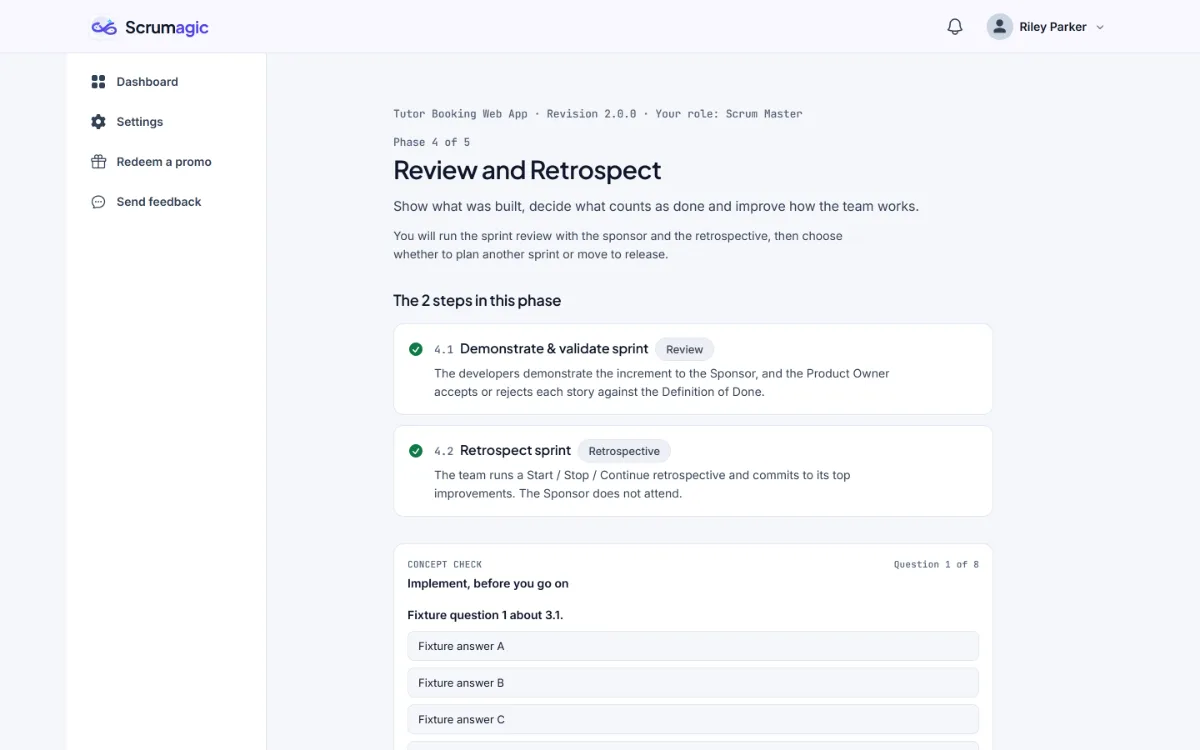
The two steps repeat at the end of each sprint. The matching Scrum events are the Sprint Review and the Sprint Retrospective, and the Sprint Review is not a demo and the purpose of the Sprint Retrospective explain each in general. Where the SBOK® Guide, Fifth Edition, has a matching process, we name it. The Scrum Guide and the SBOK side by side shows how the two documents relate.
Step 4.1: demonstrate and validate the sprint
What you see. The increment, the stories, the Definition of Done and the impediment log.
What happens. The developers demonstrate the increment to the sponsor. The Product Owner accepts or rejects each story against the Definition of Done. In the Scrum Master role you are in the room, and in the Developer role you take part in the demonstration.
What you decide. Whether you confirm the acceptance register, and where rejected work goes. This is the Product Owner's decision in that role, and a decision the other roles watch.
What it produces. An acceptance register, the stakeholder feedback and the increment as it stands.
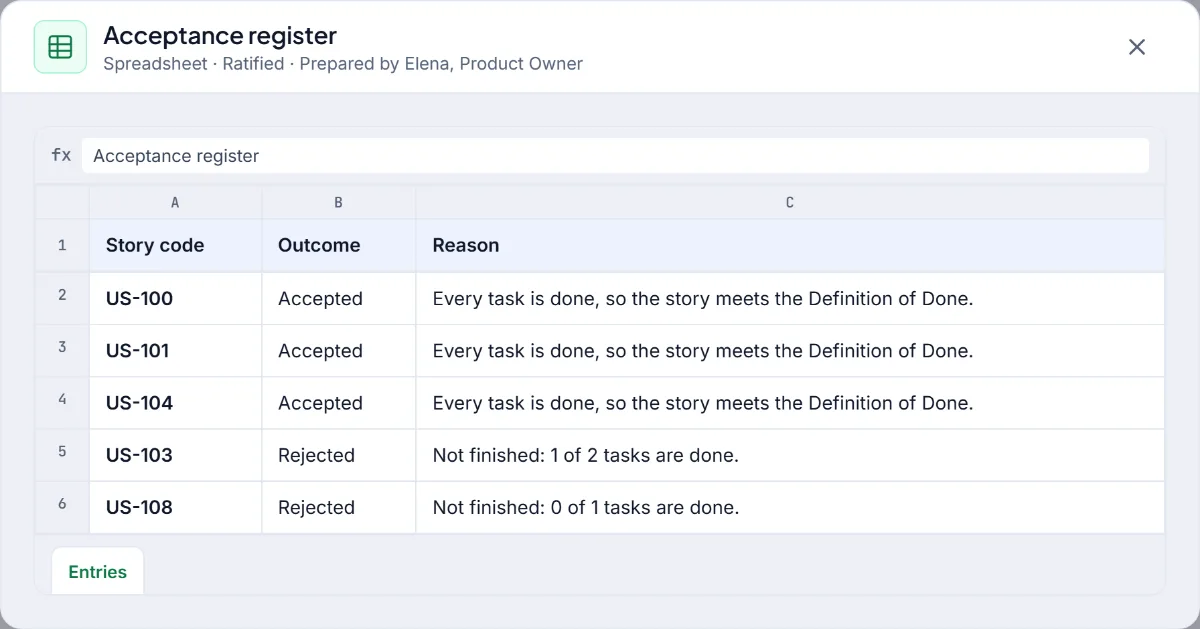
This is the SBOK's Demonstrate and Validate Sprint process, in which the Product Owner accepts or rejects each story against its criteria. The Scrum Guide describes the same event as a working session in which the team and stakeholders inspect the outcome and decide what to do next, and our post on the Increment explains what counts as part of one.
Two things are worth noticing in the register. A story is either accepted or it is not, and there is no partial credit. And what happens to rejected work, whether it returns to the top of the backlog or waits, is part of what you are deciding.
Step 4.2: retrospect the sprint
What you see. The acceptance register, the burndown, the impediment log and the sprint metrics: velocity, burndown and impediment history for the sprint that just ended.
What happens. The team runs a Start, Stop and Continue retrospective and commits to its top improvements. The sponsor does not attend, which is a rule the simulation keeps.
What you decide. Which improvements the team commits to. The decision is recorded, and you can see how the team's commitments carry into the next sprint.
What it produces. A retrospective board and a set of action items, each with an owner and a due date.
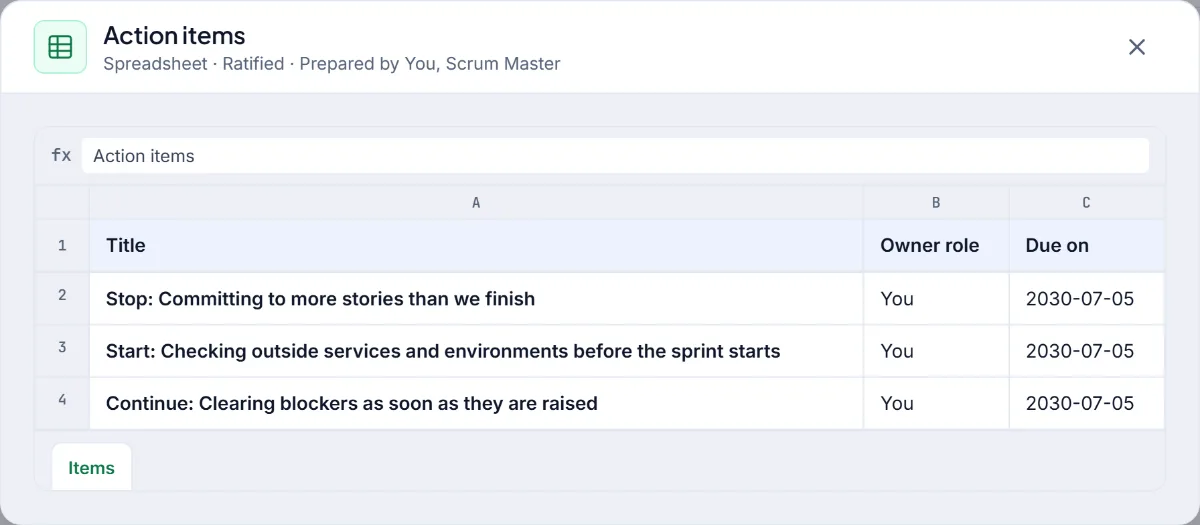
This is the SBOK's Retrospect Sprint process, and its output of agreed actionable improvements is the same idea as the Scrum Guide's changes added to the next Sprint Backlog. Retrospective actions that actually happen explains why the owner and the date matter.
How the roles differ here
At the review, the Scrum Master is in the room and keeps the conversation about what is true. The developers demonstrate the increment, which means a Developer is one of the people showing the work and answering questions about it. The Product Owner accepts or rejects each story, and is the only role that does. At the retrospective, all three take part and each brings something different: the Scrum Master facilitates, the developers describe how the work felt, and the Product Owner says what the sprint looked like from outside.
What to watch for
- The register is binary. A story is accepted or it is not. Notice how it feels to reject something that is nearly there, and what the team does with the feeling.
- Evidence beats impression. The review inspects what was built, and the Definition of Done is the shared yardstick.
- Improvements need owners. Compare the action items from your first retrospective with the ones from your last, and see whether the team did what it said.
Plan another sprint, or release
After the retrospective, you decide whether to plan another sprint or to move to the release. The scenario has a planned number of sprints, and sometimes it allows an extra one. Planning another sprint repeats Phases 2 to 4 with what you learned carried over. Moving on takes you to Phase 5.
Reading the output
Look at the stakeholder feedback that comes out of the review as well as the register. It is the evidence for the next sprint's ordering: what the sponsor said, what they asked about and what they did not notice. A review that produces a register and no feedback has only done half of its job. Backlog refinement is where that feedback turns into changes to the backlog.
What carries forward
Phase 4 is where earlier decisions are judged. A commitment made in Phase 2, a blocker handled in Phase 3 and a request accepted or deferred all show up here, as stories that are done or not and improvements that the team chooses. It is also the phase that makes repeating a sprint worthwhile: the second time you plan, you plan with the retrospective's actions in front of you.
Phase 4 and later phases need a Pro plan, and the pricing page has the details. Everything in the simulation is fictional.
SBOK® is a registered trademark of its owner. Scrumagic is independent and is not affiliated with the owners of SBOK®.
Nothing opened? This computer may have no email program set up. Write it in Gmail or use the copy button and paste the link into your email.